Is Best Buy Run by Idiots?

Last week, a relatively unknown young man posted a clever and amusing animated video to YouTube, poking fun at the sometimes blind following garnered by the iPhone. The video (not safe for work due to language) features two cute, furry animals talking in electronically-generated speech, standing in a nondescript outdoor environment referred to as Phone Mart. The video does not openly disparage either of the products it mentions: the iPhone 4 and the HTC EVO. The video does not in any capacity mention or suggest Best Buy. Neither this video nor the other videos posted by the creator suggest any personal or professional association with Best Buy.

Fast forward a week, and Best Buy has learned that the video’s creator has worked in its mobile sales group for years. Despite the facts that this video has nothing to do with Best Buy, doesn’t suggest Best Buy in any way, doesn’t identify the creator as being associated with Best Buy, and is so clearly satire that it can’t be interpreted as disparaging either mentioned product, Best Buy suspended the employee indefinitely and is purportedly now trying to fire the employee.

Throw in a holiday weekend with lots of tech news and a grand total of over 3 million views on YouTube, and the public is now baffled by Best Buy’s move. As am I. I’m an iPhone owner and an Apple investor. I bought an iPhone 4 on the first day it was available. This video is mocking people like me, and I found the video to be very funny and accurate about iPhone buyers’ brand loyalty. That’s the point. That’s what’s being mocked here—not the products themselves.

Best Buy would have likely never been associated with this video in any way if its management team had respected some boundaries and done nothing. I’m still trying to figure out why they’d even be inclined to investigate if this innocuous video had any Best Buy affiliation.

I can only draw one conclusion: Best Buy is run by idiots. I’ve been a Best Buy stockholder for years, but today I sold my shares at a net loss, because I don’t think it’s good business to invest in a company that’s run by idiots. Then I let Best Buy know that and why I sold my shares today. I’ll also be watching the news to find out where the video’s creator ends up. I’ll buy stock in the company that hires him.

Apple Does the Tablet Right with iPad

Unless you’ve been living under a rock for the past week or so, you probably can’t have helped but notice that this Saturday marked the release of Apple’s new mobile tablet device, the iPad. With the iPad, Apple tries to break open a market segment that major market forces, like Microsoft and Intel, have been unsuccessfully trying to crack for years. Microsoft alone has made no fewer than four attempts at defining mobile tablet/slate platforms, including the Tablet PC and the dead-on-arrival UMPC (“Origami”) devices.

So what makes Apple think that the iPad will succeed where so many others have repeatedly failed? There’s a vocal contingent that believes a market for this type of device just doesn’t exist. There’s also a contingent that’s intensely opposed to the closed model that Apple typically imposes on its products and services. And, of course, there’s the sin-of-all-sins: it doesn’t support Flash (a shared character flaw that the iPhone and iPod Touch have somehow endured). With all of this stacked against it, things don’t look so good, do they?

I don’t think I can remember any product that’s been so divisive and polarizing as the iPad. The haters and the fanboys alike have been all up-in-arms, way before anyone had actually seen or used the damned thing! Professional colleagues of mine—people I greatly respect—have been nastily slamming the product on Twitter and on their blogs. When I asked Molly Wood, one of my favorite CNET editors and tech pundits, whether she’d be buying one, I believe her response was, “Hell, no.” Meanwhile, others claim the iPad will change everything.

Having tried (and ultimately retired) several early tablet devices, there was no doubt in my mind that I’d be buying an iPad. The only question was “which model?” I deliberated for weeks over whether I’d be buying the WiFi-only version released on April 3 or the WiFi+3G model, which wouldn’t be available until “Late April”. After much personal waffling and some poignant feedback from the Twitter community, I pre-ordered the one with 3G.

Then, last week: the media frenzy. News reports, reviews, magazine covers, and even an entire episode of Modern Family heralded the new device. My clients were talking about it and posting links to review sites. My mother—who’s never used email or the Web in her life—was asking me about it. Then the lines started forming. In Palo Alto and New York City, people were queueing and preparing to camp overnight. I just couldn’t take it anymore—I had to have one, and I couldn’t wait until “late April” to get mine.

Buying the iPad

There’s a secret to buying a new Apple device on the day it’s first available: arrive at the Apple Store a few hours after the store opens. While my local Best Buy didn’t have the product available in time for their store opening, the Bethesda Apple Store had enough stock to still be selling to customers arriving at 11:00 a.m. It’s not that there wasn’t a line—there was. But the Apple Store staff was friendly, organized, and efficient. They served breakfast bars and snacks while customers waited, regularly surveyed the line to see if their supply would meet with the demand, and let people know which models were still available all the while. I arrived at 10:30, I was in the store by 10:45, and I left the store at 10:49 with iPad, dock, and case in tow. Meanwhile, the Geeks at Best Buy were claiming that they didn’t get their 30-unit shipment.

Surveying the iPad

There’s a common (and not necessarily inaccurate) belief that the iPad is just a big iPod Touch. People accuse the product of this quality, as if it’s a bad thing. Why is it a bad thing? With an iPhone or iPod Touch, you can surf the web better than on most mobile devices; read and compose email; manage your calendar; find nearby restaurants with available seating; get directions; listen to music; buy and watch video and movies; control your a/v and home automation system; read books; and thousands (maybe millions?) of other things.

Imagine all of that on a larger screen. Imagine scrolling through web pages at their full resolution. Imagine reading email on a full-size screen and composing messages with a full-size virtual keyboard. Imagine reading maps or watching movies and TV shows on that same screen. Imagine the iTunes Store looking like, well, the iTunes Store. Imagine the pages of an eBook that look and behave just like their analog counterparts. Then think about what else you could do with all that real estate….

You could edit documents, slides, and ledgers; you could draw…or paint; you could play board and table games; you could read the comics or the entire newspaper; you could blog; you could present; you could play a musical keyboard; you could use it as a digital picture frame. With more than double the screen space in both dimensions, the possibilities are likely an order of magnitude greater than on Apple’s earlier, smaller mobile products.

So clearly I like the idea of a big iPod Touch. Enough so that I bought the iPad. I think it holds promise and opportunity. I think it’s useful—far more useful than the tiny, clunky netbook sitting in the corner of my TV room. I don’t have to unhook the iPad from it’s charger (it docks); I don’t have to turn it on and wait for it to boot or resume; I don’t have to struggle with its tiny track-pad; I don’t have to recharge it after just three hours of use; I don’t have to dig it out of my bag at airport security (or do I?).

Using the iPad

Spend five minutes with the iPad, and you’ll find that it delivers everything it offers. The screen is clear and beautiful. I was leery of the seemingly low 1024 x 768 screen resolution, but it delivers bright, crisp, clear images. Get over the somewhat reflective, glossy finish (because that’s just how screens are designed now), and you’ll find that the LED backlight is more than adequate to adjust for both interior and exterior lighting conditions. Slide, flick, and pinch with your fingers, and you’ll notice graphic processing that is immediately responsive unlike anything you’ve ever seen on a mobile device. In fact, you may not notice it at all—it just works and reacts like you’d expect it to. If you know how to use an iPhone or iPod Touch, then you’ll know how to use the iPad. But it’s bigger and faster.

The built-in applications take advantage of the iPad’s impressive processing speed and large display area. Viewing and manipulating maps, including Street View, is smooth and instantaneous. Calendars look like they belong on your wall or desk. And video…I’m not even quite sure how to describe video playback on this thing. It’s gorgeous. HD video can be purchased on or synched to the iPad, and the display quality and rendering is flawless.

The iPad’s virtual keyboard may take some getting used to if you haven’t used an on-screen touch keyboard before. While I aspire to touch type on the keyboard in landscape mode, I’m finding the portrait-mode keyboard easier for hunt-and-peck typing. If you’re familiar with the iPhone’s soft keyboard, you’ll be pleased to find that the iPad adds basic punctuation to the main keyboard. And if you’re thinking of doing any heavy-duty typing, you can add a docked or Bluetooth keyboard—a feature missing from the iPhone and iPod Touch.

In addition to everything else, the iPad is a book reader—an excellent reader. Both Apple and Amazon have released free reader apps, giving you access to a vast library of eBook content for purchase, including your existing Kindle library. And, of course, you have access to your entire Audible library in iTunes as well.

Using the Apps

What makes the iPhone OS devices most useful and exceptional is the enormous collection of applications available in the App Store from Apple and third-party developers. Out of the box, the iPad can run and sync with most iPhone apps, but don’t get too excited about that. While they may technically function on the larger screen, iPhone apps running in the 1X and 2X magnification modes are far from ideal. At 1X, apps seems sorely lacking, while the 2X mode looks blocky and over magnified. And unlike all other iPad functions (including the OS itself), iPhone apps won’t work in landscape mode unless the app is written to support it.

So what about apps specifically designed for the iPad? Well, there’s good news and bad news there. Technically, Apple has only been accepting iPad apps for a little over a week, so the store and the apps it contains are pretty young right now. And that’s the nicest possible way I know how to say that I hope (and expect) it will get better in the coming weeks. Apple’s own iWork apps are quite impressive, and at $10 apiece, they seem to be setting the baseline against which all other heavy-duty iPad apps will get measured. Meanwhile, the Omni Group introduced OmniGraffle for the iPad at nearly $50 in the same week that WolframAlpha was re-introduced for iPhone and iPad at just $2. Clearly the market will need to work out an optimal pricing model, just like it did for iPhone apps. I bought WolframAlpha, and I’d buy OmniGraffle at $10, but there’s no way in Hell that I’ll spend $50 for it. Period.

On the free side, there are some good and bad entrants worth mentioning:

  • If there’s any doubt about whether Amazon prioritizes distributing content or product, the Kindle app for iPad should put that to rest. In fact, you can rest assured that your investment in Kindle content is safe and ready for your iPad in a reader that rivals Apple’s own iBooks app.
  • Netflix garnered significant attention last week for introducing an iPad app that would play content from your instant queue. The reality is that the Netflix “app” is nothing more than the Netflix web site, reworked to render video in a device-compatible format. It’s nice that it’s there, but it’s a rudimentary proof-of-concept offering, it’s buggy and sluggish, and some basic site features—like rating titles and reordering your queue—don’t work at all. Hopefully they’re planning something better for a future release than just throwing an HTML5-ish version of their site into a browser control.
  • The ABC Player is a gorgeous and intuitive portal to the network’s online streaming content. That’s the good news. The bad news is that every time I’ve tried to play a video in the app, it crashes.
  • The Weather Channel’s TWC MAX+ is an impressive, visually-engaging aggregator of weather information, including forecasts, maps, and local information. My only complaint is the entirely useless home screen that presents nothing but a top-level view menu.
  • Epicurious is a gorgeous and intuitive cookbook with shopping list features and another beautiful but otherwise entirely useless home screen.
  • BBC News delivers updated news stories and videos in an easy-to-use and easy-to-read format that’s optimized for the larger screen of the iPad.
  • The ever-present Evernote is now available for the iPad, and it looks and works pretty much like you’d expect. These guys get how Apple users think and work.
  • Now Playing is an iPhone movie information and showtimes app that’s been ported to the iPad platform. Their approach: make it wider. No, seriously…that’s all this app seems to offer over the iPhone version. They’ve done absolutely nothing to flatten their application hierarchy (as Apple’s iPad UI Guidelines recommend) or otherwise take advantage of the additional screen space.
  • HomeSeer’s HSTouchPad is pretty much what it sounds like—a touchpad app for HomeSeer home automation software. Unfortunately, it would seem that HomeSeer’s developers didn’t even bother to skim Apple’s iPad Human Interface Guidelines. Users would be better off running HomeSeer’s amateurishly-designed web app in Safari.
  • Google’s popular suite of web-based cloud applications—including Gmail, Calendar, Reader, and Docs—is iPad ready! Just fire up Safari and go.
  • My recommendation to the team responsible for the Zillow real estate app, recently rereleased to support the iPad: go back to the drawing board. Seriously.

Life Goes On…and Gets Better

So the iPad is here, and I have one. On initial inspection, it doesn’t seem to be an enormous failure, nor can we yet conclude it’s the game changer that many have suggested (and I believe). That’s the objective perspective. My more subjective opinion is that it’s a pretty damned amazing device, and I suspect that mine will become a common appliance around the house, on the coffee table, and in my travel bag. Some things seem clear: iPad v 1.0 makes many productivity, entertainment, and general computing functions simple and enjoyable—but there’s still room for improvement. Hardware alone cannot make this market segment successful. Developers must improve their software offerings, the app market pricing must rationalize somewhat, and Apple will likely evolve the iPad hardware over coming years. Frankly, I can’t wait.

CES 2010 Wrap-up

Companies showed their wares at this year’s CES, and I spent just two days on the show floor, trying to see as much as I could. Disappointingly, I was hard pressed to find DVRs or any tru2way devices, but there were plenty of other media, mobile, and computing devices to ogle. Here are some of my favorite finds.


Western Digital TV Live

Microsoft was showing off the device compatibility and media sharing capabilities of its Windows product line. This may Western Digital box may look like an ordinary external hard drive, but it’s not. The Western Digital TV Live is a networked, DLNA-compliant device that lets your TV stream video content from the Internet or from your own home network—at 1080p. And it works as a Play To destination for media on your Windows 7 PC. Connect it to your TV and audio systems with HDMI and S/PDIF or with analog component video and audio out. You can also piggy-back up to 2 external USB hard drives for local media storage.


LG Networked Storage

On the server side, LG was showing off Windows 7 certified networked storage devices, including a new Super Multi NAS with Blu-ray re-writer drive. This DLNA-compliant, multi-terabyte server can stream media to players throughout your home, and Blu-ray storage gives you true, lifetime backups for removable, offsite archives.


Archos 9

In what clearly came across as a pre-emptive “me too” move, Microsoft showcased tablet devices—most of which don’t exist yet. This rare exception, the Archos 9, does exist. $550 gets you an 8.9″ touchscreen Windows 7 tablet running the Intel ATOM 1.1 GHz processor. It’s a beautiful device, but at 17mm thick, it seems bulkier than it should and evokes memories of Origami. This is, in fact, Microsoft’s fourth attempt at a portable, touchscreen device (following, the Tablet PC, the SmartDisplay, and the UMPC).


Sony's Dash tabletop Internet device

Sony’s new Dash is a tabletop Internet device for the home that looks strikingly similar to one of Sony’s newer digital alarm clocks (snooze button and all). It’s actually a Chumby in a new suit that—perhaps not coincidentally—can double as an alarm clock. It features a clever design and an accelerometer that flips the screen when laid on its back. It will be interesting to see if people are willing to shell out about $200 for tabletop widgets when this thing comes out.


Flipower USB charger

How do you charge your phone or portable device when you already have two things plugged into the only nearby outlet? Powertech proposes a new solution to the problem: piggy-back on something that’s already plugged in. Just slip the flip-out tongue of the Flipower USB charger over the prongs of your lamp, alarm clock, or whatever, and plug it back in. Voila! The charger pulls juice from the prongs plugged into the outlet then swivels for easy access. Innovative, eh? So much so that it was one of the Innovations Honorees at this year’s show. The manufacturer hopes to have these in retail channels by the second half of 2010.


Sony Ericsson Xperia X10

The Sony Ericsson Xperia X10 is a beautiful, thin Android phone with an insane display resolution of 854 x 480. The interface is fluid and responsive, and the device itself fits perfectly in your hand. Communications—calls, messaging, and social media updates—are aggregated in single, scrollable timeline. Its 8.1 megapixel camera includes smile detection, flash, and face recognition software, and the media applications are just gorgeous. It uses removable microSD cards for up to 16GB of storage.

But don’t go stand in line at your local wireless service provider just yet—this baby is only going to be available through Rogers in Canada.


POLLI-Brick structural blocks

MINIWIZ built its booth with POLLI-Brick—a recycled polymer structural block created from old plastic bottles that are reformed into interlocking blocks. These blocks are fitted together and UV coated to provide a translucent, insulated curtain wall. Installed solar LED lighting adds ambient light to the space and a pleasing visual effect.

It’s not just a concept. POLLI-Brick is being used in the construction of a new building for the 2010 Taipei International Flora Exposition.


LG X300

LG’s X300 is a very thin ultra-portable PC with an 11.6″ display, a 2GHz Atom processor, and SSD storage. Built-in 3G, WiFi, and Bluetooth enable online access and synchronization, including specialized software that allows you to sync and reply to text messages from your netbook. When can you expect to find this on shelves? Uh….


LG thin LED TV prototype

Plenty of folks have been showing thin TV prototypes for the past few years at CES. And while last year LG was demonstrating small OLED TVs on flexible substrates, this year it’s about more practically-sized thin LED displays. Their thin LED TV prototype is so thin, you may be wondering where it is in this picture. It’s the vertical black line dead center—too thin for me to focus on it. The image on this 55″ display was bright and vibrant, but most people were mesmerized by the side angle view, as in this photograph.


Pro-Power Kit with Straight Blade Inlet

Don’t have power on the wall where you want to mount your TV? No problem. DATACOMM’s innovative Recessed Pro-Power Kit with Straight Blade Inlet lets you connect power and media cabling to your TV through the wall. At first glance, this looks a little frightening, but that male plug on the lower plate isn’t hot—it’s basically just an in-wall extension cord. The plate with the outlet goes on the wall where you plan to mount your TV. Then install the plate with the male plug near your equipment and plug it in to your surge protector or power conditioner with an ordinary heavy-duty extension cord.


HD HomeRun CableCARD prototype

Of everything at CES this year, my favorite product, by far, is SiliconDust’s breadboard prototype of the HD HomeRun CableCARD TV tuner. These guys already make one of the best home theater devices available—a network-based ATSC and QAM tuner that works on nearly every HTPC platform, including Sage TV on Linux, EyeTV on the Mac, and Media Center on the PC. This new CableCARD product will split a single digital cable input, decode it based on your subscribed services, and distribute the two signals to Windows 7 Media Center PCs in your house over your wired home network. And they expect to have a product on the market by the second half of the year, at a price point under $250. That’s two networked tuners for about the same price as ATI’s single-tuner CableCARD decoder.

My CES 2010 Posts on Twitter

It was a much busier (though smaller) CES this year. There were some notable no-shows on the floor, but overall it seemed like a much better show. Here are some of my thoughts that I posted on Twitter as I experienced the show.

WhatAnnoysMe Dear CEA: Love the free press lunch at #CES, but these cocktail napkins are useless.
WhatIveLearned Sony Ericsson’s new Xperia X10 Android phone will only be available through Rogers…in Canada. #CES #CNETCES http://twitpic.com/xefzg
WhatIveLearned Pelican case for the iPhone includes a waterproof headphone jack that supports audio out, but not the mic for the phone. #CES #CNETCES
WhatImpressesMe Watching @BuzzOutLoud live on stage at #CES. #CNETCES
WhatAnnoysMe Marvel has a HUGE booth at #CES. I still have no idea what they do.
WhatAnnoysMe EHX@CES is kind of pathetic. I hope it’s not a sign of what to expect at the March expo in Orlando. #CES http://twitpic.com/xfak6
WhatAnnoysMe Not sure which is more obscene: the booth babes at #CES or the attention they drawl.
WhatImpressesMe Control 4 home control has a phenomenal number of partner vendors exhibiting at its booth. #CES #CNETCES http://twitpic.com/xfi8t
WhatImpressesMe Silicon Dust is showing off a prototype HD HomeRun CableCARD tuner. Network-based, 2 tuners, <$250! #CES #CNETCES http://twitpic.com/xfwt1
WhatIveLearned Mental note to self: the pre-emptive Aleve, before hitting the show floor, worked. #CES
WhatIveLearned Apple’s Genius playlist feature on the iPhone and iPod Touch is powered by Gracenote. #CES
WhatIveLearned #CES packing tip: Don’t pack more socks than you need. They take up space, and how often do you really change your socks mid-day anyway?
WhatImpressesMe I’m onboard and ready to go. Spoke with @acedtect in the airport, and I got an exit row with lots of legroom. A nice end to a great #CES.

Review of the Acoustic Research XSight Color Universal Remote

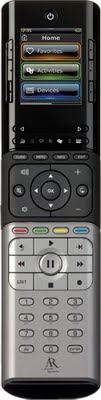
At last year’s CES, Acoustic Research announced new entries into the programmable home theater remote market with the XSight Color and XSight Touch. Now available online and at local retailers, these might initially look like worthy competitors to Logitech’s Harmony One and 900. But not so fast…it’s worth a closer look.

The XSight Color, the least expensive of the two remotes, lists at just under $150. It can be programmed to control up to 15 different devices via IR, using web-based configuration software on your Windows PC or a guided setup process on the device itself. For another $100, the XSight Touch can control 18 devices and includes touchscreen control. Add an RF base to the Touch for another $100 (totaling about $350) for controlling you system without line of sight.

Like Logitech’s Harmony remotes, the XSight models allow you to control your home theater system by device or by multi-device activities like “Watch TV” or “Listen to Music.” In addition, the XSight lets you set up profiles, allowing you to create different sets of favorite channels to suit your mood or for different people in your household.

An LCD color screen at the top of the XSight displays menu options and programmable soft keys that you select using buttons lining both sides of the screen. On the XSight Touch, as implied, the buttons are replaced by a touchscreen. The screen is bright and crisp, at a resolution that seems comparable to the Harmony. But between color choices and font smoothing techniques, the screen on the XSight is far more readable than on Logitech’s remotes. An elongated toggle button lets you move between multiple onscreen options. On the Touch, a buttonless slider zone (à la iPhone unlock) performs the same function.

Setting Things Up

You can perform basic programming on the XSight without a computer, but to set up anything beyond basic device control—like creating soft keys on the LCD screen, creating multi-device activities, and defining favorites and profiles—you’ll need a Windows PC running Internet Explorer. The programming software uses an ActiveX control that requires IE. It won’t run in any other browser and therefore offers no support for Mac users. Even running Windows in a virtual machine on the Mac, the interface software wouldn’t recognize the USB-connected remote, so if you’re an exclusive Mac user, this is a non-starter.

Programming the appropriate devices and activities for a home theater system with a TV, amplifier, video switch, DVR, movie server, and Internet streaming device proved to be more difficult than expected. The programming software claimed to support the Moxi DVR, but none of the keys functioned for it. Setting up an Apple TV required manually capturing IR codes from an Apple Remote. Windows Media Center had the best support of the tested devices, but the default soft keys seemed a bit unusual, including two separate Record buttons that duplicated a physical key on the remote itself. It’s easy to redefine or add soft keys for any device or activity, but it doesn’t seem possible to specify their arrangement on the screen.

Defining favorites and profiles is very straightforward, and the configuration software provides an extensive selection of network icons for your favorite channels, unlike Logitech’s limited set of icons for FOX networks only. By creating different profiles, each member of your household can have a different set of favorites. You can also use this same feature to create different profiles based on programming. For example, a profile for sports channels, one for movie channels, etc.

Using the XSight

The XSight Color is a sturdy remote. It feels noticeably heavier than the Harmony One—partly the weight from three AA batteries—and it doesn’t fit in your hand a nicely as the One. Its straight edge “candy bar” design ultimately yields a device that is bottom-heavy and somewhat hard to grip. The XSight Touch uses a rechargeable (and presumably lighter) battery pack and comes with a charging cradle, like the Harmony One.

The remote senses motion when you pick it up and has nicely backlit buttons—with a few notable exceptions: The four color buttons used commonly by Blu-ray players and other devices have no backlight, and the buttons lining the screen on the XSight Color have very little backlighting except around their edges. This last bit is especially tricky, since the screen itself is bright and begs for touching. Making it worse, the on-screen buttons look 3-dimensional and don’t in any way hint that you should be pressing the buttons next to the screen and not the screen itself.

Physical button layout is pretty logical, but a few strange industrial design quirks make using this remote more clunky than intuitive. The first thing you might notice is that the most prominent and physically differentiable button on the remote is (somewhat ironically) the Pause button. That’s right—not Play, but Pause. Nearby, the replay and skip buttons have ever-so-subtle ridges that feel more like manufacturing abnormalities than intentional guides for your fingers. And the buttons in different zones have a different feel when you press them, each offering slightly different resistance and tactile responses. In general, it seems like most of the buttons on the remote require just a tad bid more pressure than should be necessary. Finally, the four buttons that drive the content on the screen—those that switch between home, favorites, activities, and devices—are identified by 2mm icons that are way too detailed to be discernible at that size by the eyes of those most likely to afford this remote.

Both XSight remotes feature a dedicated power button, but it doesn’t function as an all on/all off command, as you might expect. Each activity will turn on your devices, as necessary, but the remote doesn’t manage the power state of each device as you select different activities, like the Harmony remotes do. In fact, if you want to be able to turn everything off at once to shut down, you need to create your own, separate All Off activity.

After a little bit of time, you may get used to some of the ergonomic anomalies of this remote, and when you do, you’ll find that it lets off some seriously powerful IR signals. Side-by-side, the XSight remote outperformed the Harmony One on numerous devices—at different angles and heights.

The Bottom Line

While it’s good to see some competition for Logitech’s latest Harmony remotes, the XSight Color and Touch from Acoustic Research are harder to configure, heavier in your hand, and less intuitive to use. This is a good foray into this market for AR, but for this kind of money, the Harmony One and 900 are still better options.

Feedback for CBS.com

I love that you make content available online. I love that I can CHOOSE a sponsor to favor during breaks, but I can’t believe you’re applying the same, annoying practice of making the audio for advertisements notably louder than the content itself. For years the networks have been claiming technical limitations prevent proper limiting. That’s crap, and we all know it. There’s no reason whatsoever that you can’t level and normalize the audio streams so that the ads are at roughly the same level as the content. To claim otherwise is a blatant lie. To do otherwise simply demonstrates a disregard for your audience.

Comment posted to eMusic’s blog

As a long-time customer of eMusic, I feel like eMusic has sold its soul to the devil by changing its subscription model in exchange for the Sony Music catalog. Seeing higher prices per song is disappointing, but not surprising. eMusic’s amazing pricing plans were inevitably going to change to attract bigger labels, and I think eMusic customers could have lived with that. Even limiting the number of times customers can download a song is annoying, but still better than many other online music stores.

But Sony has also inflicted it’s misaligned digital value model on eMusic. Many “Albums” on Sony labels now count as 12 downloads — no matter how many tracks they have. Why, why, WHY? In eMusic’s earlier model, each song in an album counted as a download. If an album had 5 tracks, it cost 5 downloads. If it had 32, it cost 32. We were OK with that. We preferred that. It was simple, and it worked.

What is INEXCUSABLE, however, is that eMusic has changed its download model to address the music industry’s unwillingness to offer à la carte downloads. Many songs are now “locked” to an album — unavailable unless you waste points on songs you don’t also want by downloading the entire album. And oftentimes that album price is fixed at 12 points — even when it contains less than 12 tracks.

Sony needs to hear a message from its consumers and from its distributors that this will not stand. eMusic needs to realize that pandering to the music industry’s disregard for consumers is NOT the right business model.

Am I glad that Sony music is available on eMusic? Sure, but not at this cost. I’m not talking about the price per song — I’m talking about the price of corrupting one of the industry’s best distribution models. So I’ll download some more music — maybe even Sony music — while my current prepaid subscription is active. Then I’m out.

Sorry eMusic. You screwed up here. And I find it hard to believe you don’t see it that way, too.


On eMusic’s blog, 17 dots, there are nearly 2000 comments in response to eMusic’s announcement about the Sony deal. So many comments that mine, though accepted, is not visible. Scanning through the lot, the feedback seems largely negative. No surprise there.

My CES 2009 Posts on Twitter

CES this year was exhausting, loud, and slightly less crowded, but nonetheless interesting. I used Twitter to quickly post information about my experience.

WhatImpressesMe Great seat near front center section at Balmer keynote. #ces09
WhatAnnoysMe I’d be a lot happier now if I had taken time to eat before the keynote. #ces09
WhatAnnoysMe First night of the show, and I already forgot to have some cards with me. #ces09
WhatImpressesMe Seeing my first SteadyCam in the wild. Incredibly cool. #ces09
WhatIveLearned Balmer announced that Windows 7 beta is now available on TechNet and MSDN. #ces09
WhatAnnoysMe It occurs to me that I should have brought a better camera to the keynote. #ces09
WhatIveLearned @jimmyfallon is coming to CES. So Jimmy, are you a gadget freak, a correspondant, or a special appearance at #ces09 ?
WhatIveLearned HP is discontinuing its MediaSmart Connect Media Center Extender. #ces09
WhatIveLearned RealDVD will work on your Windows-based HTPC with a standard Media Center remote control. #ces09
WhatIveLearned Nero LiquidTV brings TiVo (for analog cable, ATSC, and clear QAM) to your HTPC and stores programs as standard MPEG-2 video. #ces09
WhatAnnoysMe OK, it’s official: I hate the way the Blackberry Storm soft buttons and keys work. #ces09
WhatAnnoysMe I forgot how much I hate these assholes that walk through CES with their roller-bags. #ces09
WhatIveLearned SanDisk will be selling 2.5″ Solid state drives later this year. $249 for 120GB, $499 for 240GB. #ces09
WhatImpressesMe Sexyist memory card reader I’ve ever seen. #ces09 http://twitpic.com/10txh
WhatIveLearned The menus in Windows 7 Media Center now support touch gestures. #ces09
WhatAnnoysMe Missed the Digeo Moxi press conference–didn’t know about it. #ces09
WhatIveLearned Motorola is showing off a set-top box with caller ID and medication reminders–for the fully integrated life! #ces09
WhatAnnoysMe Played with Surface a little earlier. Not exciting…it’s still too abstract. #ces09
WhatImpressesMe Insanely thin television screens at the LG booth. #ces09 http://twitpic.com/10vmj
WhatImpressesMe Southwire is finally demonstrating Flatwire for 120v electrical current–UL cert pending. #ces09
WhatAnnoysMe Should have arrived at CNET’s Next Big Thing session earlier. I’m litterally standing in the back corner. And can we have some air? #ces09
WhatAnnoysMe Really? You’re going to come in late and then stand in front if us? #ces09
WhatAnnoysMe Worse: most of these latecomers are leaving mid-session, lacking the stamina to stand for an hour. #ces09
WhatAnnoysMe Sony just seems irrelevant to me anymore. They lost me on root kits. #ces09
WhatAnnoysMe Once again running late for live @BuzzOutLoud show. Maybe by tomorrow I’ll get this right. #ces09
WhatIveLearned Sony BRAVIA Link let’s you choose from snap-in modules (DVD, Tru2Way, HDMI), integrating selection and control with the TV’s menu. #ces09
WhatIveLearned Canon does optical image stabilization by moving the glass IN the lens with a gyro. #ces09
WhatAnnoysMe iLuv is showing off a dummy prototype of a new iPod/DVD player; not a working prototype–a mockup like you’d find in Best Buy. #ces09
WhatImpressesMe Mattel is showing Mind Flex, a game where you navigate a ball through a maze…with your mind. http://twitpic.com/11ips #ces09
WhatIveLearned Boxee is doing a closed test of a Windows version now. #ces09
WhatIveLearned Powercast is demonstrating RF power-over-distance harvesting with lighted ornaments and lighted tile prototypes. #ces09
WhatAnnoysMe I’m calling it. I’m officially CESed out. Had a great time, but my back hurts, my feet hurt, and now I need to think and write. #ces09

I’ve Got Moxi

In 2007, Digeo announced plans to launch a consumer DVR, which I reviewed for CNET at CES. Then just one year later, with no product to market, Digeo significantly reorganized, refocused, and suspended their plans for a consumer DVR. Or did they? A/V geeks like me have been watching the progress of the Moxi digital video recorder for years now. Digeo, the company behind Moxi for the past six plus years, has seen some degree of success supplying Moxi DVRs through cable companies, but it’s taken them a very long time to get a standalone DVR out to consumers.

So why are people fired up about the Moxi? For one, Moxi is worthy competition for TiVo—the gold standard for home DVRs. TiVo leads in a somewhat challenging market space. Numerous companies—including Replay, Panasonic, Samsung, Sony, and Microsoft—have tried and failed to compete in this space. Even DirecTV, once a TiVo licensee, has strayed and since announced its return to the TiVo world. About the only thing really cutting into TiVo’s market these days is the cable industry itself. Cable companies have achieved success leasing DVRs to their customers for a monthly fee. They offer the convenience of home television recording without the significant up-front cost.

But TiVo is an aging contender, and the overall user experience hasn’t changed or improved significantly since TiVo’s inception–nearly ten years ago. The time is right for some worthy competition.

Enter Moxi. Last month—nearly two years after the CES announcement—Digeo quietly (and somewhat unexpectedly) released the Moxi HD DVR, available for limited release exclusively through Amazon.com. Digeo is expected to make a more public splash with the device this January at CES 2009. In the meantime, $799.99 at Amazon gets you a two-tuner high definition video recorder with 500 GB of storage and lifetime updates to TV listings. The price tag may scare some people, but when you break it down and compare it to the cost of ownership for other DVR options, the cost is not unreasonable.

The Details

Moxi has the expected features for an HD DVR: it’s a two tuner recorder for digital HD cable, using a single multi-stream CableCARD to decode the signal. The device has nearly every type of connection possible: outputs include component, composite, S-Video, HDMI for video plus RCA, coax, and optical audio. Ethernet and USB connect the device to the outside world, and an eSATA connection lets you add your own external storage. The Moxi includes cables for nearly all the connections, including HDMI. You’ll need to bring your own digital audio, USB, and eSATA cables, though.

The Moxi remote is similar in form factor to other DVR remotes. It includes all of the expected functions broken into navigation, shuttle, and keypad zones, but some features are labeled with obscure symbols. The buttons are generally placed where you’d expect to find them. One feature the remote lacks is a dedicated button that takes you to the full program guide, which may take some getting used to for those in your household with less patience. [“Richard, why is there a Setup menu when I press the Moxi button?”]

Bright, sharp menus; high-resolution channel icons; and smooth graphical motion are the hallmarks of Moxi’s beautiful two-dimensional menu system. It’s fairly intuitive and easy to use, and it’s pretty responsive. For channel surfing, Moxi offers two modes: a quick guide that lets you flip through channel cards in the lower third area of the screen and a full, graphical 2D alternative to the traditional grid guide. In either mode, you can watch the current channel while you surf. The Moxi program guide takes some getting used to, but once you’re acclimated, the old grid seems as antiquated as your parent’s TV Guide subscription.

In the Moxi menu, you can navigate left or right through an endless loop of modes including pre-filtered programming (e.g., sports, movies, favorites, kids, HD), access to music and photos, games, and settings. Moving between modes expands a vertical menu that lets you select the applicable content or options. Moxi also includes a news feed program, MoxiNet, that seems slow, stale, and out of place in this otherwise stunning UI.

Recording shows with your remote is straightforward, but tedious. Finding programs to record is no easier or harder than you might expect. You have lots of options for recording individual shows and series, but there’s no way to specify your default recording preferences for all shows. So for example, if you typically want to record and keep all new episodes of a show until space is needed, you must record the series, then edit the series recording options, and change three settings (keep all, only new, ’til space is needed). Since you can’t define these default options for all shows, you have to go through these steps for every new series you record. Viewing the list of recorded programs for playback, however, is simple—it’s one of the only Moxi menu features that has a dedicated button on the remote.

Digeo also provides Moxi owners with remote programming capabilities through the web. This service lets you record shows with realtime confirmation and conflict resolution, view a list of scheduled and recorded programs, and cancel scheduled recordings. Digeo advertises that the Moxi HD DVR can record about 300 hours of SD or 75 hours of HD programming. If that’s not enough for you, you can expand the available storage by adding your own external eSATA drive. Not some specially-certified (read: expensive) device, but any eSATA drive.

It’s easy to get photos and music to the Moxi. You can load photos directly from a USB device or drive, connect to photos shared on your network, or link to specific Flickr accounts. Configuring Flickr couldn’t be easier because you do it online—none of this trying to type a username and password with an onscreen keyboard. You can play music from any Windows Media Connect source in your home, including Media Center and Windows Media Player. You can also play music from your Finetune account [who/what?]. What you can’t share with or from the Moxi device is video. You can’t get external video onto the thing, and you can’t get recorded video off. Original prototypes for Digeo’s home recorders included multi-room capabilities, but this device does not have that feature.

The Bottom Line

So how does all of this stack up with the competition? For a first release consumer product, it’s pretty impressive. It doesn’t have all of TiVo’s features and capabilities, but it sets the foundation for a new generation of consumer DVRs. And the cost is not as high as that price tag might suggest because there are no monthly service fees. The chart below shows that over a period of four years, Moxi (bolstered with additional external storage) costs less than similarly-equipped dual-tuner, 1TB TiVo and Media Center devices. However, they’re all more expensive than any box you might get from your cable company.

Moxi
TiVo HD XL
Media Center
(Dell Inspiron)
Cable DVR
Up-front device cost
$799
$599
$1,486
$0
Service fees
$399
Cable rental fees*
$144
$144
$288
$480
Add’l 500GB storage
$110
n/a
Total 4-yr cost
$1,053
$1,142
$1,774
$480

*CableCARD rental estimated at $3/month, DVR rental estimated at $10/month

Digital cable HD DVR 4 year cost of ownership comparison

Overall, Digeo has released a great new product. And while TiVo is starting to feel a little long in the tooth—its largly-unchanged UI now encumbered by a patchwork of heavily-branded, disjointed features and ads—it’s nice to see someone doing something new, something fresh. Enter Moxi.


1/14/2009 update: Table above updated to reflect cost of CableCARD rental, as suggested by a commenter.

Did DirecTV Just Serve Media Center a Fatal Blow?

Nearly three years ago at the 2006 Consumer Electronics Show, Bill Gates unveiled a deal with DirecTV that would open Windows Media Center to a whole new market—satellite customers. Two agonizing years later at CES 2008, DirecTV quietly released news about their two-tuner interface for Media Center. But just days ago, DirecTV announced it is suspending further development of this device, and I have to ponder the impact: Is this the end of the line for Media Center?

Windows Media Center has faced continued challenges from the start. Spawned from Microsoft’s lackluster Ultimate TV, Windows XP Media Center Edition was greeted with mixed reactions. The Windows PC as a DVR. But why would you want a DVR on your desk? Or a PC in your living room?

And so Media Center evolves, eventually finding its way onto devices from the likes of HP, Gateway, and Sony that look more like and fit better with consumers’ home entertainment equipment. CE companies produce Media Center remotes and build extenders that let you use the Media Center from any TV in the home. Except that nobody buys them because the boxes are priced on par with similarly capable computers instead of similarly capable set-top boxes. Why pay $1000 for a PC when you can spend $300 for a TiVo—or just rent a DVR from your cable or satellite service provider?

Meanwhile, HDTV is gaining ground, and while TiVo seems entirely incapable of delivering its long-promised Series 3 HD recorder, consumers start looking toward Microsoft—and Microsoft is starting to look better. With several revs of the platform, suddenly Windows Media Center supports HD! Over the air. Only. But it’s more than TiVo’s offering, save for a select few early-adopting satellite customers. And it’s far better than what most local cable providers can provide at the time.

So Microsoft puts the moves on. Windows Vista overhauls the whole on-screen experience, once again rejuvenating interest in Media Center as a home entertainment platform. Microsoft talks about a future with CableCard support for HD cable tuners, your HD DVD movie collection right on your hard drive, and TVs with Media Center built right in. And then, in early 2006, Gates announces the entry into a largely untapped market with deals to support DirecTV and Sky.

But when Vista comes out, the CableCard support isn’t there, and consumers soon realize that their Media Center PC is using more CPU cycles to protect the interests of the content providers than to provide the engaging access to media that they were sold. Available extenders don’t support HD content yet, Sony introduces and retires a few more overpriced living room devices, HD DVD tanks, and HP scraps all support for Media Center PCs and TVs. Once again, the consumers aren’t buying, and Windows Media Center is not staking its claim to the living room as Microsoft had so hoped.

Imagine the impact that DirecTV’s abandonment of Media Center must mean for Microsoft. CableCard support for Media Center PCs is largely encumbered by licensing, certification, and cost. Analog tuner support offered in earlier Media Center PCs is all but useless come February’s digital transition. Set-top box tethering has never really been a good option—especially without any high definition video connection between devices. And now support for satellite TV on Media Center seems entirely unlikely. That leaves over-the-air HD broadcasts. And that’s it. Now how much would you pay?

Nowadays, it’s a challenge to even find a Media Center PC for the living room. Most of those available today are from specialty PC manufacturers catering to high-end home theater systems. And certified CableCard support adds even more expense for consumers, starting at about $300 per tuner. Somewhat ironically, custom installers often shy away from Media Center home theater solutions. The margins are too low, and the system is so complete out of the box, there’s little opportunity for the kind of consulting revenue that a complex solution like Crestron might yield.

In many ways, Microsoft offers a superior home entertainment platform. It provides multi-tuner recording capabilities from multiple sources with no monthly fees; it delivers a visually engaging and intuitive on-screen experience; it provides seamless access to music, video, and photos on your network; it presents a platform that third-party developers can and do use to expand its capabilities; and it doesn’t spam you with ads at every turn.

Nonetheless, it’s pretty clear that Windows Media Center is flailing. Licensing, pricing, certification, content protection, poor vendor hardware support, and now economic trends have all played a part in Media Center’s failure to attract the audience it deserves. It’s probably fair to assume that a handful of poor business decisions have also contributed to this mess. This week’s announcement from DirecTV has to be the worst possible news at this point.

So is this it for Media Center? Windows 7 promises to enhance the media experience with a refreshed interface and integrated online content. But it may be too late. And if the next wave of Media Center devices remains overpriced and encumbered by corporate jockeying, Windows Media Center could go the way of Web TV, remaining a niche product for a very small market. One thing is certain: I’m not believing anything I see at Microsoft’s Media Center kiosk this January until it’s on my own home theater PC.